Tuesday, July 8, 2014

DB File Sequential Read wait event is High on Oracle Database - Performance Engineering to Find out where is Bottleneck?

Found one interesting problem during performance testing , wanted to share here.

Observed there is a drop on server throughput, Correlated Load runner Throughput graph with Average Response time graph:

From the above Graph for the first 25mins ART was so high and that time throughput was low , after that both the graphs are stable.

So what happened on first 25mins of the load test , Lets go and do some analysis on server.

So we should start checking the servers ( web/app/DB ) to find out where is the problem , most likely throughput related issues occurs from DB side , lets start investigating from Data base server first.

Started checking with Database first and observed there is a high user I/O activity during high response time (low throughput).
So from OEM console, observed high user I/O.

So we can see the problematic SQL, which is making high User I/O.


So click on above SQL ID and see what event is making this high user I/O ( so by now at least we know which SQL is the culprit)


So above graph shows DB file sequential read event is more  , so get either AWR or ADDM report or Talk to DBA to know why this is so high?

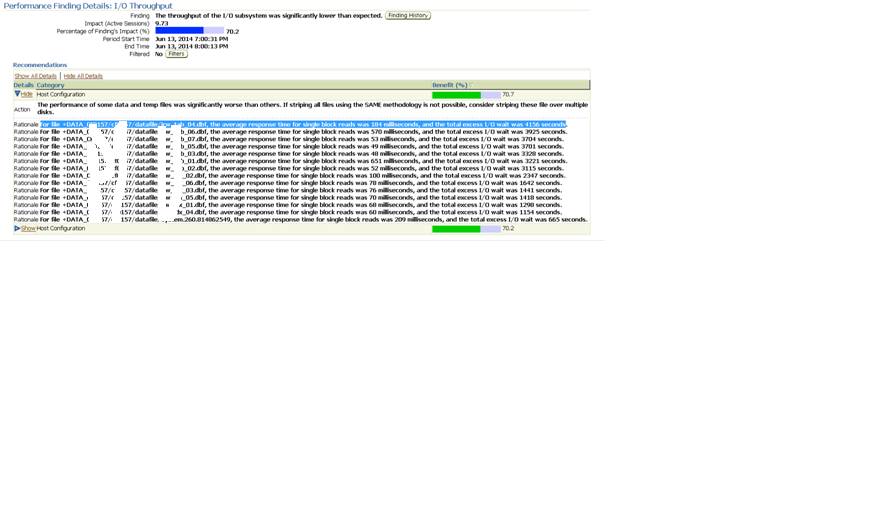
So when I generate ADDM report for Oracle recommendations below is what I got.

The performance of some data and temp files was significantly worse than others. If striping all files using the SAME methodology is not possible, consider striping these file over multiple disks.

For file +DATA_XXXXXXXX/datafile/XXXX_tab_04.dbf, the average response time for single block reads was 184 milliseconds, and the total excess I/O wait was 4156 seconds.

Below would the mitigations we can follow to overcome this issue:

DB File Sequential Read wait event occurs when we are trying to access data using index and oracle is waiting for the read of index block from disk to buffer cache to complete.  A sequential read is a single-block read.Single block I/Os are usually the result of using indexes. Rarely, full table scan calls could get truncated to a single block call due to extent boundaries, or buffers already present in the buffer cache.Db file sequential read wait events may also appear when undo blocks are read from disk in order to provide a consistent get(rarely).

To determine the actual object being waited can be checked by the p1, p2, p3 info in v$session_wait .  A sequential read is usually a single-block read, although it is possible to see sequential reads for more than one block (See P3). This wait may also be seen for reads from datafile headers (P2 indicates a file header read) ,where p1,p2 and p3 gives the the absolute file number ,the block being read ,and  the number of blocks (i.e, P3 should be 1) respectively. 

Block reads are fairly inevitable so the aim should be to minimise un-necessary IO. This is best achieved by good application design and efficient execution plans. Changes to execution plans can yield orders of magnitude changes in performance.Hence to reduce this wait event follow the below points .

1.)
 Tune Oracle - tuning SQL statements to reduce unnecessary I/O request is the only guaranteed way to reduce "db file sequential read" wait time.
2.)
 Tune Physical Devices - Distribute(stripe) the data on diferent disk to reduce the i/o . Logical distribution is useless. "Physical" I/O performance is only governed by "independency of devices".
3.)
 Faster Disk - Buy the faster disk to reduce the unnecessary I/O request .
4.)
 Increase db_block_buffers - A larger buffer cache can (not will, "might") help.


Hope This helps :) 


Get CPU utilization of Linux based machine using 

Vmstat.


Generally time stamp may not be available by default for vmstat command in Linux ( check if vmstat -t works ?).

Check the below command for monitoring CPU usage of your server with time stamp using vmstat.

vmstat 60 60 | awk '{now=strftime("%Y-%m-%d %T "); print now,100-$15}' >CPUUsage.txt

60 60 -> Every 60 secs, one sample will be taken and total 60 times reading will be taken
now -> variable where we are storing the time
print now -> Time Stamp will be printed along with vmstat output
$15 -> 15th Column output ( which is ID value on vmstat , idle time, so 100-idle time with give non-idle time of CPU).


if you want to copy the output to a separate text file using (  >CPUUsage.txt ) any file name.  so output will be available at CPUUsage.txt text file.

Output:

$ vmstat 60 60 | awk '{now=strftime("%Y-%m-%d %T "); print now,100-$15}'
2014-06-18 11:43:10  13
2014-06-18 11:43:10  10
2014-06-18 11:43:10  8
2014-06-18 11:44:10  12

So here first column is for time stamp and second column is for CPU utilization , take this values and draw a graph from XL :) happy learning.

How to monitor Linux server memory usage by using 

vmstat?


During performance testing monitoring, we are supposed to check how memory is being utilized for your Linux server, but how?
If you can use simple vmstat (have a look at attached SS). You may not get accurate used memory utilization, if you use vmstat –s will facilities this need but we need to iterate this to get memory usage during entire tenure of your performance tests.


Below small shell script will print the used memory along with time stamp.

for i in {1..120}
do
vmstat -s | sed "s/$/$(date)/" | awk '/used memory/'
sleep 30
done


Note: this will take the reading for every 30 seconds and  for 120 times.
If you want to print the output into a file use the below command.
./sampleloop.sh > UsedMemory1.txt
Where sampleloop.sh is your shell script name (copy past the above code in the file named as sampleloop.sh) and UsedMemory1.txt is the text file where you want to print the output.

Sample Output:
      1674660  used memoryWed Jun 18 09:52:46 UTC 2014
      1504104  used memoryWed Jun 18 09:53:16 UTC 2014
      1623140  used memoryWed Jun 18 09:53:46 UTC 2014
      1675956  used memoryWed Jun 18 09:54:16 UTC 2014
      1675624  used memoryWed Jun 18 09:54:46 UTC 2014
      1591800  used memoryWed Jun 18 09:55:16 UTC 2014
      1676364  used memoryWed Jun 18 09:55:46 UTC 2014
      1685188  used memoryWed Jun 18 09:56:16 UTC 2014
      1558236  used memoryWed Jun 18 09:56:46 UTC 2014

Wednesday, May 14, 2014

Tune the Oracle for Performance improvements during Performance testing

Oracle data base Performance improvements during Performance testing.

Let’s assume an instance that you observed multiple execution plans, during performance testing of your application SQL’s, wondering why & how to resolve?  Here I will try to explain why oracle SQL will have multiple execution plans and how it will impact overall performance (response times of your transactions, server throughput, etc...) of your data base.

What is execution plan?
When a SQL statement is executed, the database must convert the query into an execution plan and choose the best way to retrieve the data. For Oracle, each SQL query has many choices for execution plans, including which index to use to retrieve table row, what order in which to join multiple tables together, and which internal join methods to use (Oracle has nested loop joins, hash joins, star joins, and sort merge join methods). These execution plans are computed by the Oracle cost-based SQL optimizer commonly known as the CBO.


The choice of executions plans made by the Oracle SQL optimizer is only as good as the Oracle statistics. To always choose the best execution plan for a SQL query, Oracle relies on information about the tables and indexes in the query.
Once the optimizer has done its job, it provides an execution plan to Oracle. An execution plan is like a set of instructions that tells Oracle how to go and get the data

What is database gather stats and why should I do gather stats frequently on my data base?

Oracle has its own feature to generate the statistics on each table and indexes, CBO (cost based optimizer uses this statistics and make better execution plans for your SQL query so that SQL can be executed quicker).
We should gather stats on data base as and when there are major changes on data base like production data was populated on your test data base, major changes happened to tables and indexes, etc… that time we should gather stats so that better execution plans can be created by CBO. So that we will have better performance.


How to gather data base stats?

Oracle provides a stored procedure (or program) for you to run that will generate the statistics is needs.
Example:
declare
Begin
DBinstancename.wcsgather_Stats('Tablename');
End;


Example2:
From SQL Developer, check when table’s statics are gathered, click on the table. You will be able to see statistics tab.  Check when is last analyzed. Make sure tables are analyzed when there are major changes on your test data base.


 If you want to gather stats how?
Just run the above procedure or from SQL developer below are the steps.


From OEM (Oracle enterprise manager), we can monitor where your SQL has any multiple execution plans.
Snapshot from OEM for Multiple execution plans found for an SQL.


So if you see like this you should first check whether gather stats are done properly, if yes and still you see multiple execution plans than start analysis from SQL perspective.
A snapshot for without any multiple execution plans:


 So finally what I wanted to share on this post is , gather stats are important on database as it will affect your performance test results in terms of SQL speed.
If SQL is retrieving the data slowly because of bad execution plans obviously your transactions response times will effect.

In the next post, I will share more on AWR, ADDM and ASH reports, how to analyze bad SQL’s and fix… wait for my next post J  


Friday, April 4, 2014

Web service Performance Testing using Load runner

This post explains about the performance test scripting for web service without recording.

we have various methods to test the web service performance testing in load runner it self , by using web service protocol.

More feasible way is by using web custom request , this would facilities more reliable scripting.

Taken  weather report as an example for load runner scripting  (Sample SOAP requests are available on below site).

http://www.webservicex.com/globalweather.asmx.

1) Choose Web(HTTP/HTML) protocol and Don't record , put the below simple code will serve the purpose.

Action()
{

   char *request_xml;


   // save web service url to param
    char *URL = "http://www.webservicex.com/globalweather.asmx";
    lr_save_string(URL, "URL_Param");


 // save xml request to param
 request_xml=
  "<?xml version=\"1.0\" encoding=\"utf-8\"?>"
  "<soap:Envelope xmlns:xsi=\"http://www.w3.org/2001/XMLSchema-instance\" xmlns:xsd=\"http://www.w3.org/2001/XMLSchema\" xmlns:soap=\"http://schemas.xmlsoap.org/soap/envelope/\">"
    "<soap:Body>"
     "<GetWeather xmlns=\"http://www.webserviceX.NET\">"
    "<CityName>Seattle</CityName>"
    "<CountryName>United States</CountryName>"
     "</GetWeather>"
    "</soap:Body>"
  "</soap:Envelope>";

 lr_save_string(request_xml, "REQUEST_XML_PARAM");

 // add http headers

 web_add_header("Host", "www.webservicex.com");


 web_add_header("Content-Type", "text/xml; charset=utf-8");


 web_add_header("SOAPAction", "http://www.webserviceX.NET/GetWeather");


         // validate response
 web_reg_find("Text=SEATTLE-TACOMA INTERNATIONAL  AIRPORT , WA, United States (KSEA)", LAST);

 //SEATTLE-TACOMA INTERNATIONAL AIRPORT , WA, United States
 //
 //
 // send request
 //

 lr_start_transaction("post_xml");

 //  This is to capture the Temperature of the "Seattle" City.


 web_reg_save_param("ResponseBody",
    "LB=Temperature",
    "RB=/Temperature",
    "Search=Body",
    "IgnoreRedirections=Yes",
    LAST);


  web_custom_request("post_to_http_jms_provider",
   "URL={URL_Param}",
   "Method=POST",
   "TargetFrame=",
   "Resource=0",
   "Referer=",
   "Mode=HTTP",
   "Body={REQUEST_XML_PARAM}",
   LAST);


  lr_output_message("Temp is<>: %s",lr_eval_string("{ResponseBody}"));


 lr_end_transaction("post_xml", LR_AUTO);
}


Out put of the script execution:

with extended log enabled on load runner script.

Virtual User Script started at : 2014-04-04 20:17:00
Starting action vuser_init.
Web Turbo Replay of LoadRunner 11.0.0 for Windows 7; build 8825 (Aug 15 2010 23:38:14)   [MsgId: MMSG-27143]
Run Mode: HTML   [MsgId: MMSG-26000]
Run-Time Settings file: "C:\Users\\AppData\Local\Temp\noname1\\default.cfg"   [MsgId: MMSG-27141]
Ending action vuser_init.
Running Vuser...
Starting iteration 1.
Starting action Action.
Action.c(10): Notify: Saving Parameter "URL_Param = http://www.webservicex.com/globalweather.asmx".
Action.c(25): Notify: Saving Parameter "REQUEST_XML_PARAM = <?xml version="1.0" encoding="utf-8"?><soap:Envelope xmlns:xsi="http://www.w3.org/2001/XMLSchema-instance" xmlns:xsd="http://www.w3.org/2001/XMLSchema" xmlns:soap="http://schemas.xmlsoap.org/soap/envelope/"><soap:Body><GetWeather xmlns="http://www.webserviceX.NET"><CityName>Seattle</CityName><CountryName>United States</CountryName></GetWeather></soap:Body></soap:Envelope>".
Action.c(29): Warning -26593: The header being added may cause unpredictable results when applied to all ensuing URLs. It is added anyway   [MsgId: MWAR-26593]
Action.c(29): web_add_header("Host") highest severity level was "warning"   [MsgId: MMSG-26391]
Action.c(32): Warning -26593: The header being added may cause unpredictable results when applied to all ensuing URLs. It is added anyway   [MsgId: MWAR-26593]
Action.c(32): web_add_header("Content-Type") highest severity level was "warning"   [MsgId: MMSG-26391]
Action.c(35): web_add_header("SOAPAction") was successful   [MsgId: MMSG-26392]
Action.c(40): Registering web_reg_find was successful   [MsgId: MMSG-26390]
Action.c(48): Notify: Transaction "post_xml" started.
Action.c(53): Registering web_reg_save_param was successful   [MsgId: MMSG-26390]
Action.c(63): Notify: Parameter Substitution: parameter "URL_Param" =  "http://www.webservicex.com/globalweather.asmx"
Action.c(63): Notify: Parameter Substitution: parameter "REQUEST_XML_PARAM" =  "<?xml version="1.0" encoding="utf-8"?><soap:Envelope xmlns:xsi="http://www.w3.org/2001/XMLSchema-instance" xmlns:xsd="http://www.w3.org/2001/XMLSchema" xmlns:soap="http://schemas.xmlsoap.org/soap/envelope/"><soap:Body><GetWeather xmlns="http://www.webserviceX.NET"><CityName>Seattle</CityName><CountryName>United States</CountryName></GetWeather></soap:Body></soap:Envelope>"
Action.c(63): t=763ms: 277-byte response headers for "http://www.webservicex.com/globalweather.asmx" (RelFrameId=1, Internal ID=1)
Action.c(63):     HTTP/1.1 200 OK\r\n
Action.c(63):     Cache-Control: private, max-age=0\r\n
Action.c(63):     Content-Type: text/xml; charset=utf-8\r\n
Action.c(63):     Content-Encoding: gzip\r\n
Action.c(63):     Vary: Accept-Encoding\r\n
Action.c(63):     Server: Microsoft-IIS/7.0\r\n
Action.c(63):     X-AspNet-Version: 4.0.30319\r\n
Action.c(63):     X-Powered-By: ASP.NET\r\n
Action.c(63):     Date: Fri, 04 Apr 2014 14:47:04 GMT\r\n
Action.c(63):     Content-Length: 725\r\n
Action.c(63):     \r\n
Action.c(63): t=813ms: 725-byte ENCODED response body received for "http://www.webservicex.com/globalweather.asmx" (RelFrameId=1, Internal ID=1)
Action.c(63): t=817ms: 1109-byte DECODED response body for "http://www.webservicex.com/globalweather.asmx" (RelFrameId=1, Internal ID=1)
Action.c(63):     <?xml version="1.0" encoding="utf-8"?><soap:Envelope xmlns:soap="http://schemas.xmlsoap.or
Action.c(63):     g/soap/envelope/" xmlns:xsi="http://www.w3.org/2001/XMLSchema-instance" xmlns:xsd="http://
Action.c(63):     www.w3.org/2001/XMLSchema"><soap:Body><GetWeatherResponse xmlns="http://www.webserviceX.NE
Action.c(63):     T"><GetWeatherResult>&lt;?xml version="1.0" encoding="utf-16"?&gt;\r\n
Action.c(63):     &lt;CurrentWeather&gt;\r\n
Action.c(63):       &lt;Location&gt;SEATTLE-TACOMA INTERNATIONAL  AIRPORT , WA, United States (KSEA) 47-27N
Action.c(63):     122-19W 136M&lt;/Location&gt;\r\n
Action.c(63):       &lt;Time&gt;Apr 04, 2014 - 09:53 AM EDT / 2014.04.04 1353 UTC&lt;/Time&gt;\r\n
Action.c(63):       &lt;Wind&gt; from the S (190 degrees) at 12 MPH (10 KT):0&lt;/Wind&gt;\r\n
Action.c(63):       &lt;Visibility&gt; 10 mile(s):0&lt;/Visibility&gt;\r\n
Action.c(63):       &lt;SkyConditions&gt; mostly cloudy&lt;/SkyConditions&gt;\r\n
Action.c(63):       &lt;Temperature&gt; 44.1 F (6.7 C)&lt;/Temperature&gt;\r\n
Action.c(63):       &lt;DewPoint&gt; 39.9 F (4.4 C)&lt;/DewPoint&gt;\r\n
Action.c(63):       &lt;RelativeHumidity&gt; 85%&lt;/RelativeHumidity&gt;\r\n
Action.c(63):       &lt;Pressure&gt; 29.94 in. Hg (1013 hPa)&lt;/Pressure&gt;\r\n
Action.c(63):       &lt;Status&gt;Success&lt;/Status&gt;\r\n
Action.c(63):     &lt;/CurrentWeather&gt;</GetWeatherResult></GetWeatherResponse></soap:Body></soap:Envelope
Action.c(63):     >
Action.c(63): Notify: Saving Parameter "ResponseBody = &gt; 44.1 F (6.7 C)&lt;".
Action.c(63): Registered web_reg_find successful for "Text=SEATTLE-TACOMA INTERNATIONAL  AIRPORT , WA, United States (KSEA)" (count=1)   [MsgId: MMSG-26364]
Action.c(63): web_custom_request("post_to_http_jms_provider") was successful, 725 body bytes, 277 header bytes   [MsgId: MMSG-26386]
Action.c(74): Notify: Parameter Substitution: parameter "ResponseBody" =  "&gt; 44.1 F (6.7 C)&lt;"
Action.c(74): Temp is<>: &gt; 44.1 F (6.7 C)&lt;
Action.c(80): Notify: Transaction "post_xml" ended with "Pass" status (Duration: 1.2061 Wasted Time: 0.6257).
Ending action Action.
Ending iteration 1.
Ending Vuser...
Starting action vuser_end.
Ending action vuser_end.
Vuser Terminated.

Another advantage of this process is if we want to validate the response of web service and customize it , we have lr_xml functions ( refer LR help).

example : lr_xml_get_values().


Wednesday, April 2, 2014

Performance Monitoring Tools ( Unix/Linux commands )- Server Performance Stats


Monitoring the servers during performance testing is very important and useful to find out the actual bottleneck on any specific server, now a day's most of our applications runs on Non-windows machines ( Unix /Linux , etc..) hence we should know few commands to quick monitoring , I felt below are the bare minimum commands to monitor the performance of server.

By using Perfmon we can monitor WINDOW's based servers but not Non-Windows based machines, here are few, also if we have a facility of having Monitoring tools like CA APM wily , Site scope . Dyna trace , etc.... in our testing environment that's good , it will reduce this overhead.  But if you don't have that facility below commands will surely help.

Unix/Linux Commands for Performance Monitoring:

  • vmstat
  • sar
  • iostat
  • mpstat
  • free
  • top
  • netstat
  • ps


vmstat :


vmstat reports virtual memory statistics. The following are some of vmstat command examples.

$ vmstat
procs -----------memory---------- ---swap-- -----io---- --system-- -----cpu-----                                                                                        -
 r  b   swpd   free   buff  cache   si   so    bi    bo   in   cs us sy id wa st
 2  0    332 1587232 106808 4368288    0    0   266 11974    1    7 12  6 78  5    

if you use vmstat 60 120  ,  120 reading will be taken for every 60 secs ( so for 2 hrs load test you can use this)

if you want have vmstat stats with time stamp use below command.


vmstat 3 5 | sed "s/$/$(date)/"

$ vmstat 3 5 | sed "s/$/$(date)/"
procs -----------memory---------- ---swap-- -----io---- --system-- -----cpu------Wed Mar 26 14:32:28 UTC 2014
 r  b   swpd   free   buff  cache   si   so    bi    bo   in   cs us sy id wa stWed Mar 26 14:32:28 UTC 2014
 2  0    332  44600 118912 6070464    0    0   266 11974    1    7 12  6 78  5  0Wed Mar 26 14:32:28 UTC 2014
 1  0    332  44020 119104 6061464    0    0    24 107865 2775 5262 16  7 74  4  0Wed Mar 26 14:32:28 UTC 2014


Get the "id" values (-----cpu------ Column) which is ideal time of CPU , 100-id value will give the CPU utilization.

From Above example : id value is 78 and 74, so 22 and 26 are CPU utilizations.

Sar


Using sar utility you can do two things: 1) Monitor system real time performance (CPU, Memory, I/O, etc) 2) Collect performance data in the background on an on-going basis and do analysis on the historical data to identify bottlenecks.

Sar is part of the sysstat package:

Example :

 sar 1 1
Linux 2.6.18-371.4.1.el5 (HostName)    03/26/2014

02:36:08 PM       CPU     %user     %nice   %system   %iowait    %steal     %idle
02:36:09 PM       all     17.48      0.00      6.24      5.12      0.00     71.16
Average:          all     17.48      0.00      6.24      5.12      0.00     71.16


iostat:


iostat reports CPU, disk I/O, and NFS statistics

Iostat without any argument showes CPU usage, and I/O statistics about all the partitions on the system as shown below:

avg-cpu:  %user   %nice %system %iowait  %steal   %idle
          11.84    0.00    5.79    5.01    0.00   77.36

Device:            tps   Blk_read/s   Blk_wrtn/s   Blk_read   Blk_wrtn
cciss/c0d0       16.41        52.06       365.14   59021735  413998136
cciss/c0d0p1      0.00         0.00         0.00       5262         16
cciss/c0d0p2     16.41        52.05       365.14   59016129  413998120
sda             156.52       704.20     19325.03  798415632 21910654896
sda1            156.52       704.19     19325.03  798404688 21910654896


To execute every 5 seconds for a total of 10 times, do the following

iostat 5 10


mpstat:


By default mpstat displays CPU statistics as shown below:

11:56:10 AM  CPU   %user   %nice    %sys %iowait    %irq   %soft  %steal   %idle    intr/s
11:56:10 AM  all   11.84    0.00    4.44    5.01    0.06    1.29    0.00   77.36   2913.01


$ mpstat -P ALL

Option -P ALL, displays all the individual CPUs (or Cores) along with its statistics as shown below.

1:55:16 AM  CPU   %user   %nice    %sys %iowait    %irq   %soft  %steal   %idle    intr/s
11:55:16 AM  all   11.84    0.00    4.44    5.01    0.06    1.29    0.00   77.36   2913.03
11:55:16 AM    0   12.49    0.00    3.96    3.52    0.00    1.31    0.00   78.72   1985.54
11:55:16 AM    1    9.64    0.00    4.73    9.93    0.24    4.80    0.00   70.65    496.52


To display statistics information of a particular CPU (or core) than use below
$ mpstat -P 3 ( means for 3rd core CPU stats ).

TOP:


This command will show us, which proccess is consuming more CPU and memory , this will be usefull to quickly check.

top - 12:08:17 up 13 days,  3:12,  5 users,  load average: 2.24, 1.94, 1.86
Tasks: 342 total,   3 running, 336 sleeping,   3 stopped,   0 zombie
Cpu(s): 15.9%us,  4.6%sy,  0.0%ni, 70.3%id,  7.4%wa,  0.1%hi,  1.7%si,  0.0%st
Mem:   8176252k total,  8132220k used,    44032k free,    87712k buffers
Swap:  4194288k total,      332k used,  4193956k free,  5941952k cached

  PID USER      PR  NI  VIRT  RES  SHR S %CPU %MEM    TIME+  COMMAND
16502 wasadm    23   0  390m 189m  21m S 96.3  2.4   1:03.30 java
10856 root      10  -5     0    0    0 S 15.5  0.0   2119:55 kmirrord
 8860 wasadm    14  -1 68724 1532  340 R  5.3  0.0   0:38.07 rsync
16363 wasadm    14  -1 70520 1564  340 S  5.0  0.0   0:03.01 rsync
18964 wasadm    14  -1 68468 1508  336 S  5.0  0.0   0:00.65 rsync

If you want to re-direct the output of any of these commands use  "  > filename ".

Example :

vmstat 60 120 > Sampleyloadtest.txt   ( Sampleyloadtest.txt file will be created on current directory and output will be saved for future analysis ).

Netstat:


The netstat command is a Command Prompt command used to display very detailed information about how your computer is communicating with other computers or network devices.

Specifically, the netstat command can show details about individual network connections, overall and protocol-specific networking statistics, and much more, all of which could help troubleshoot certain kinds of networking issues

For example:

netstat -an | head -10  -> will give top 10 connection details


netstat -an | grep "CONNECTED"  -> will give all connected status network details


PS

ps command will give us which process running on that server , will would help to find out process details on server.

most useful command is

ps -aef | grep java  [ will give all java process running on that server ].


Tuesday, March 25, 2014

Java Memory Leaks-Performance testing

My following posts explains about How to find Java memory leaks during performance testing , for now this post will explain about what is Java memory leak and how Java memory management will be ?

1.          About Java Memory Leak & why they happen?

Have you ever seen this situation?

  If the answer is yes, you may have a case of memory leak induced in your application, but fortunately we've got a cure for what ails you.


Above Error message Thrown when the Java Virtual Machine cannot allocate an object because it is out of memory and no more memory could be made available by the garbage collector.
An OOM or OOME (OutOfMemoryError) simply means that the JVM ran out of memory. When this occurs, you basically have 2 choices:
  • Allow the JVM to use more memory using the -Xmx VM argument. For instance, to allow the JVM to use 1 GB (1024 MB) of memory:
Java -Xmx1024m...

  • Improve/Fix the application so that it uses less memory
In many cases, like in the case of a memory leak, the second option is the only sound choice. A memory leak happens when the application keeps more and more references to objects and never releases them. The garbage collector will therefore never collect those objects and less and less free memory will be available until we reach the point where not enough free memory is available for the application to function normally. At this point, the JVM will throw an OOM.

How JVM Allocates Memory:
Let’s have a look at the Sun Hotspot JVM implementation as an example:


Java Heap space is divided into three regions or generation for sake of garbage collection - New Generation, Old or tenured Generation or Perm (permanent) Space. JVM allocates every generation its own memory pool. The JVM has at least one memory pool and it may create or remove memory pools during execution.
  1. Eden Space (heap - young generation):
    1. Pool from which memory is INITIALLY allocated for most objects.
  2. Survivor Space (heap - young generation):
    1. Pool containing objects that have survived GC of Eden space.
  3. Tenured Generation (heap - old generation):
    1. Pool containing objects that have existed for some time in the survivor space.
  4. Permanent Generation (non-heap - stack):
    1. Holds all the reflective data of the virtual machine itself, stores class level details, loading and unloading classes (e.g. JSPs), methods, String pool.
  5. Code Cache (non-heap):
    1. Hotspot JVM also includes a "code cache" containing memory used for compilation and storage of native code.
My next post will have how to find memory leak using various JDK Tools....